Cyborg Security HUNTER Hunt Packages
Browse: 🏠 · Solutions · Connectors · Methods · Tables · Content · Parsers · ASIM Parsers · ASIM Products · Logic Apps · 📊
| Attribute | Value |
|---|---|
| Connector ID | CyborgSecurity_HUNTER |
| Publisher | Cyborg Security |
| Used in Solutions | Cyborg Security HUNTER |
| Collection Method | AMA |
| Connector Definition Files | CyborgSecurity_HUNTER.json |
| Microsoft Learn | View on Learn |
Cyborg Security is a leading provider of advanced threat hunting solutions, with a mission to empower organizations with cutting-edge technology and collaborative tools to proactively detect and respond to cyber threats. Cyborg Security's flagship offering, the HUNTER Platform, combines powerful analytics, curated threat hunting content, and comprehensive hunt management capabilities to create a dynamic ecosystem for effective threat hunting operations.
Follow the steps to gain access to Cyborg Security's Community and setup the 'Open in Tool' capabilities in the HUNTER Platform.
Tables Ingested
This connector ingests data into the following tables:
| Table | Transformations | Ingestion API | Lake-Only |
|---|---|---|---|
SecurityEvent |
✓ | ✓ | ✓ |
💡 Tip: Tables with Ingestion API support allow data ingestion via the Azure Monitor Data Collector API, which also enables custom transformations during ingestion.
Permissions
Resource Provider Permissions:
- Workspace (Workspace): read and write permissions on the workspace are required.
Setup Instructions
⚠️ Note: These instructions were automatically generated from the connector's user interface definition file using AI and may not be fully accurate. Please verify all configuration steps in the Microsoft Sentinel portal.
ℹ️ Use the following link to find your Azure Tentant ID How to find your Azure Active Directory tenant ID
- ResourceGroupName & WorkspaceName:
{0} - WorkspaceID:
{0}
1. Sign up for Cyborg Security's HUNTER Community Account
Cyborg Security offers Community Memebers access to a subset of the Emerging Threat Collections and hunt packages.
Create a Free Commuinity Account to get access to Cyborg Security's Hunt Packages: Sign Up Now!
2. Configure the Open in Tool Feature
Navigate to the Environment section of the HUNTER Platform.
Fill in te Root URI of your environment in the section labeled Microsoft Sentinel. Replace the
with the IDs and Names of your Subscription, Resource Groups and Workspaces. https://portal.azure.com#@AzureTenantID/blade/Microsoft_OperationsManagementSuite_Workspace/Logs.ReactView/resourceId/%2Fsubscriptions%2FAzureSubscriptionID%2Fresourcegroups%2FResourceGroupName%2Fproviders%2Fmicrosoft.operationalinsights%2Fworkspaces%2F<WorkspaceName>/
Click Save.
3. Execute a HUNTER hunt pacakge in Microsoft Sentinel
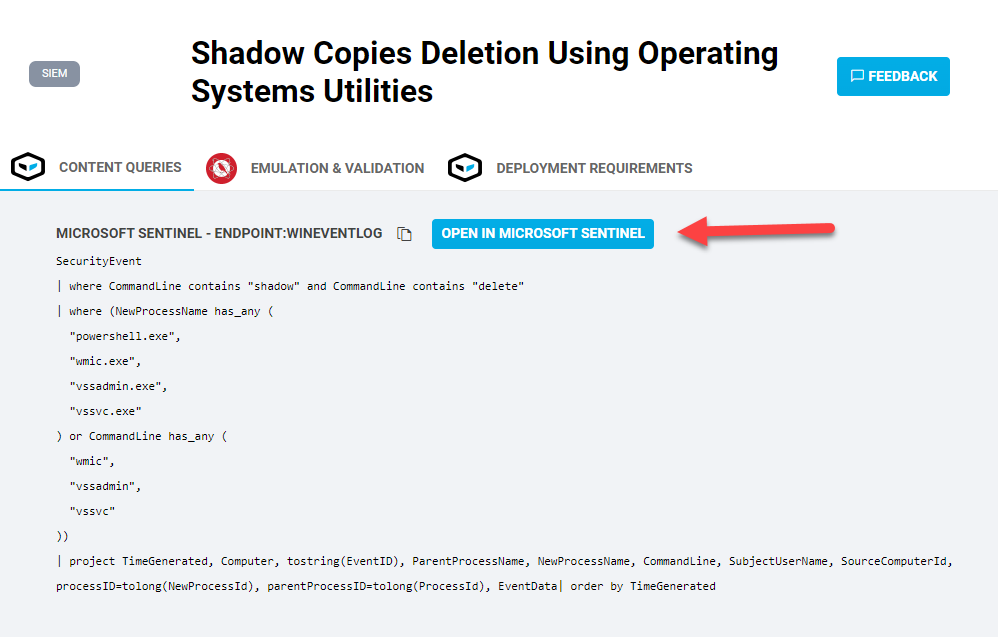
Identify a Cyborg Security HUNTER hunt package to deploy and use the Open In Tool button to quickly open Microsoft Sentinel and stage the hunting content.
Browse: 🏠 · Solutions · Connectors · Methods · Tables · Content · Parsers · ASIM Parsers · ASIM Products · Logic Apps · 📊